
Basic Setup
Get Card Companion configured for your server in minutes.
This guide covers the essential configuration for setting up Card Companion. For more detail on any feature, continue with the tutorials that follow this one.
All server configuration uses the /config command. View your current settings at any time:
Or open the interactive menu:
/config menuServer configuration requires Administrator, Manage Server, or a configured mod role.
Drop Analysis#
Drop Analysis is the core feature — Card Companion reads Karuta card drops and displays wishlist counts, print numbers, and pog alerts automatically.
Enable drop analysis server-wide:
/config karuta drop_analysis enable_embeds:TrueEmbed Format#
Choose what information appears in each drop embed. Pass one of these values to /config karuta custom_embed format_type:
Date Solver#
The Date Solver automatically solves Karuta daily puzzles and posts answers in a configured channel.
Enable date solving:
/config karuta date_solver enabled:TrueSet the channel where answers are posted:
/config karuta date_solver date_channel:#date-channelDrop Pings#
Card Companion can ping roles when special drops occur. There are three ping types.
Event Item Pings#
Ping a role when event items or new edition cards drop:
/config karuta event_item role:@Role enabled:True type:Server Drops OnlyThe type option accepts Server Drops Only, User Drops Only, or Server and User Drops.
Server Drop Pings#
Ping a role whenever Karuta drops cards in a channel:
/config karuta server_drops role:@Role enabled:TruePog Drop Pings#
Ping a role when a high-wishlist or low-print card is dropped. Pick a pog_type matching the tier you want to watch:
Add a custom emoji that appears on pog drops:
/config karuta pog_drops pog_type:Single Print pog_role:@Role pog_emoji:🌸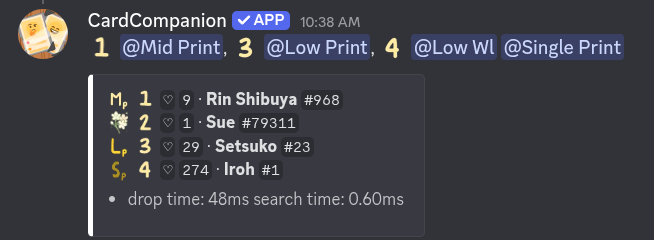
Starboard#
Card Companion automatically reposts standout drops to a dedicated starboard channel. A card is starboarded if its wishlist is at or above wishlist_threshold or its print is at or below print_threshold.

Troubleshooting#
Bot Doesn't Respond#
If Card Companion isn't reacting to drops or dates:
Check that drop analysis or date solving is enabled for the channel. Use /config view to confirm.
Check that the bot has the correct channel permissions. Run /check-permissions in the affected channel to get a full permission report.
Drop Failures#
Drop processing can occasionally take longer when Discord's API is under load. Most drops are returned within a second. Drop and print reads exceed 99.7% accuracy across all drops — if you spot an incorrect reading, please report it in the support server.
Ready for more? Continue with the Custom Embed tutorial to personalise how drop embeds look.
Last updated June 12, 2026