
Drop Pings
Ping roles for event drops, server drops, and high-value pog cards.
Card Companion supports three independent ping systems. Each can be configured separately with its own roles, conditions, and drop scope.
Event Item Pings#
Pings a role when an event item or new edition card drops.
/config karuta event_item role:@Role enabled:True type:Server Drops OnlyType options:
Server Drops Only— only pings for Karuta server dropsUser Drops Only— only pings for user dropsServer and User Drops— pings for both
Server Drop Pings#
Pings a role every time Karuta drops cards in a channel (regardless of the cards' value).
/config karuta server_drops role:@Role enabled:TruePog Drop Pings#
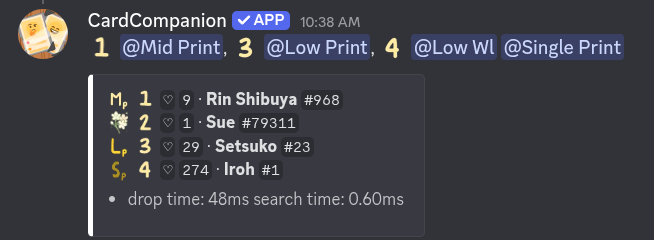
Pings a role when a high-wishlist or low-print card is detected. You can configure multiple tiers with independent roles and emojis.
Available pog types:
| Category | Types |
|---|---|
| Wishlist | High Wishlist, Mid Wishlist, Low Wishlist |
| Single Print, Mid Print, Low Print |
Set a wishlist pog with a custom threshold:
/config karuta pog_drops pog_type:High Wishlist pog_value:1500 pog_role:@role pog_emoji:💛Set a print pog:
/config karuta pog_drops pog_type:Single Print pog_role:@role pog_emoji:🌸Limit pog pings to a specific drop scope (global):
/config karuta pog_drops allowed_types:Server Drops Onlypog_emoji accepts any non-empty text — it replaces the default flower emoji on pog drop embeds.
Last updated June 12, 2026