
Auto Verification
Automatically assign Discord roles when users run k!ui and meet requirements.
Auto Verification watches for k!ui commands and automatically assigns configured Discord roles to users who meet all stat requirements. It removes the need for manual verification checks.
Enabling Auto Verification#
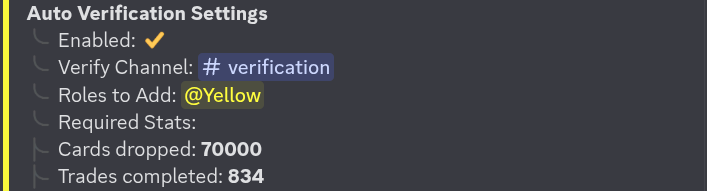
Enable the feature and set the channel where k!ui must be run:
Setting Roles#
Configure which roles are assigned when a user passes verification:
/config karuta auto_verify roles_to_add:@member,@verifiedMultiple roles can be specified as a comma-separated list of role mentions or IDs.
Stat Requirements#
Add requirements that users must meet before roles are assigned:
/config karuta auto_verify stat:Cards grabbed value:5000Users must satisfy every configured requirement. Common stat options include:
Cards grabbedCards burnedBitsMorphs
Remove a requirement:
/config karuta auto_verify remove_stat:Cards grabbedHow It Works#
A user runs k!ui in the configured verification channel.
Card Companion reads their Karuta profile stats from the k!ui embed.
If all stat requirements are met, the configured roles are assigned immediately.
Card Companion must have the Manage Roles permission, and its role must be above the roles it assigns in the server hierarchy.
Last updated June 12, 2026